
What Is an IPTV Player App?
Understanding the distinction between software players and streaming lines.
An IPTV player app is media software installed on your streaming hardware. Think of it like a digital television tuner box. The app itself contains zero built-in channels, movies, or sports feeds. Instead, it reads your playlist data, organizes channel bouquets into categories, renders your TV guide, and decodes the incoming video feed onto your screen.
To watch television, you connect the app to an active IPTV UK subscription using an Xtream Codes login or M3U playlist URL. Without active login credentials, an IPTV app is just an empty software shell. Pairing a high-performance player with high-speed server lines is what delivers smooth, broadcast-quality television.
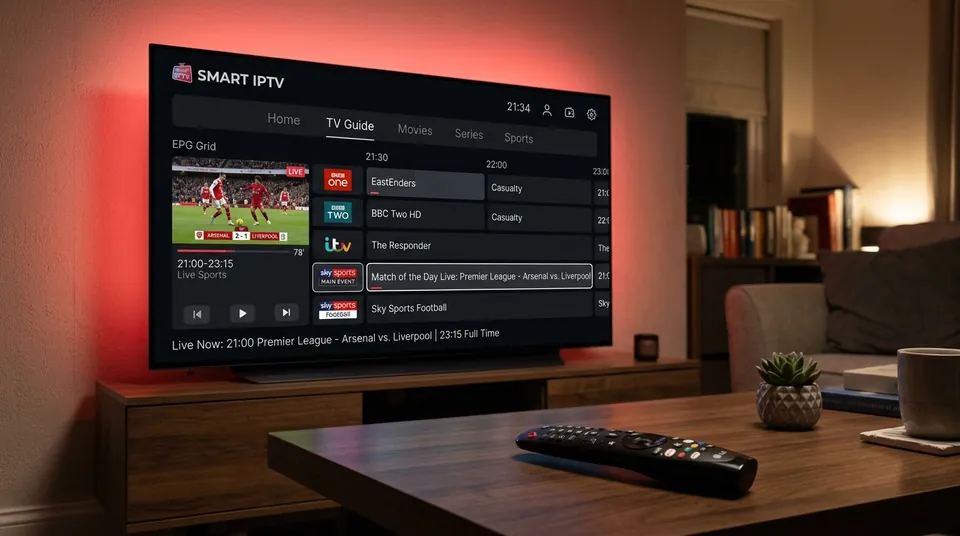
Which IPTV Apps Work With IPTV Subscriptions?
We test our UK streams across dozens of players. These are the six most dependable choices for British viewers.
TiviMate
The undisputed benchmark for Android TV and Amazon Firestick. Developed specifically for big screens, TiviMate delivers an interface that looks and feels just like traditional Sky Q or Virgin TV 360. Features sub-second channel zapping, 4-screen multiview, catch-up TV, and automatic 50Hz frame rate switching. Read our full TiviMate guide.
IPTV Smarters Pro
The most widely installed IPTV app in the world. Smarters runs on almost everything: Firestick, Android, iOS, Windows, Mac, and Samsung/LG Smart TVs. It features a clean three-box dashboard separating Live TV, Movies, and Series. Supports Xtream Codes, multiple playlists, and subtitle tracks. Check our IPTV Smarters Pro guide.
XCIPTV
A fast, tile-based Android player with built-in dual media players (ExoPlayer and VLC). Designed with a modern media-centre layout, XCIPTV runs remarkably well on budget streaming sticks with limited processing power. Features automated EPG reminders and VOD trailer playback. Explore our XCIPTV guide.
IBO Player
The premier player for Samsung Smart TVs (Tizen OS) and LG Smart TVs (webOS). Available directly from your TV’s built-in app store without any sideloading required. Setup takes two minutes via MAC address upload on your phone or laptop. Supports fast 4K video streams and crisp channel categories. View our IBO Player guide.
Smart IPTV
The pioneer smart TV streaming app (often known as SIPTV). Ultra-minimalist interface with an extremely small memory footprint. Ideal for older Samsung and LG sets where memory pools are tight. Upload your M3U playlist via the SIPTV web portal and start streaming immediately. Read our Smart IPTV guide.
Other IPTV Player Apps
For Apple TV and iOS users, UHF and TiviMax offer gorgeous tvOS interfaces with full EPG syncing. On Android, OTT Navigator and Televizo deliver deep technical customisation. On desktop, SFVIP Player and VLC offer instant playback while working.
Compare the Best IPTV Apps
Detailed technical comparison table and tailored recommendations for every British living room device.
| App | Platform | EPG Style | 50fps AFR | Multi-Screen | Catch-Up | Price | Best For |
|---|---|---|---|---|---|---|---|
| TiviMate | Firestick, Android TV | Sky Q Grid | Yes (Auto) | Up to 9 screens | Yes | Free / £30 Life | Living Room Firesticks & Shield |
| IPTV Smarters Pro | All Platforms (iOS/TV/PC) | Tile / List View | Manual | 4 Screens | Yes | Free / £10 Pro | Beginners & Multi-Device Households |
| IBO Player | Samsung & LG Smart TVs | Modern Grid | Hardware Native | No | Yes | 7-Day Trial / ~€8 | Samsung & LG Living Room TVs |
| XCIPTV | Android TV, Firestick | Classic EPG | Hardware Native | 2 Screens | Yes | 100% Free | Budget Sticks & Simple VOD Navigation |
| Smart IPTV (SIPTV) | Samsung, LG, Android | Minimalist List | Hardware Native | No | Basic | 7-Day Trial / €5.49 | Older Smart TVs with Limited Memory |
| UHF / TiviMax | Apple TV 4K, iPhone, iPad | Fluid tvOS Grid | Yes (Apple Match) | 4 Screens | Yes | Free / £15 Pro | Apple Ecosystem Enthusiasts |
Best IPTV App for Firestick
TiviMate Premium is the undisputed champion on Amazon Fire TV Stick. It handles 50fps UK sports without frame judder and loads channel logos in an instant. Install it in under two minutes via the Downloader app. Follow our Firestick setup guide.
Best IPTV App for Android TV
TiviMate installed directly from the Google Play Store on Nvidia Shield, Chromecast with Google TV, and Sony Bravia sets. Pair it with our Xtream Codes login for sub-second channel changes and 4-match multiview.
Best IPTV App for Samsung Smart TV
IBO Player. Search for it inside the Samsung App Store on your Tizen TV. It avoids the need for external HDMI dongles and responds instantly to the Samsung One Remote. Read our Samsung TV IPTV guide.
Best IPTV App for LG Smart TV
IBO Player on LG webOS. Works natively with the LG Magic Remote pointer for quick channel hopping. Streams 4K UHD HDR sports without heating up the TV. See our LG TV guide.
Best IPTV App for Apple TV
UHF or TiviMax. Both utilize Apple’s A15 Bionic processor for buttery-smooth scrolling, Siri remote integration, and automatic 50Hz/60Hz frame rate switching. Check our Apple TV guide.
Best IPTV App for iPhone & iPad
IPTV Smarters Pro for iOS or UHF. Perfect for catching Saturday Premier League football when away from home on 5G mobile data. Features seamless AirPlay streaming. See our iPhone and iPad guide.
Best IPTV App for Windows & Mac
IPTV Smarters Desktop or SFVIP Player on PC. On Mac, use Smarters or VLC. Stream matches at your desk with floating picture-in-picture windows. View our PC and Mac guide.
What Makes a Good IPTV Player App?
Key features that distinguish an elite streaming app from clunky, frustrating players.
Easy IPTV Setup
The app should allow effortless login via Xtream Codes API (Server URL, Username, Password) rather than forcing you to type tedious 150-character M3U links using a TV remote.
EPG & TV Guide Support
A fast electronic programme guide that loads 7-day British TV schedules automatically, synchronizes to UK GMT/BST time, and updates in the background. Learn more about our EPG system.
Live TV & VOD Support
Clean division between live broadcast channels, cinema movies, and box sets, with full IMDb metadata, cast lists, plot synopses, and resume-watching memory.
Multiple Playlist Support
The ability to store backup playlist accounts within one interface, allowing seamless switching without deleting your primary configuration.
Catch-Up & Recording Features
Rewind live television across popular UK channels over the past 3 to 7 days, or schedule digital PVR recordings directly to your USB drive or network storage.
Subtitles & Audio Options
Support for embedded closed captions, external SRT subtitle downloads, and multi-track audio switching between UK stadium commentary and alternative language feeds.
4K & HD Playback
Hardware video acceleration (HW decoding) supporting HEVC (H.265) and 50fps video feeds without dropped frames or thermal CPU throttling.
Easy Navigation and Remote Control
Intuitive D-pad navigation with fast number-key channel zapping, channel history, and customizable favourite groups so the entire household can use it effortlessly.
Which IPTV App Should You Choose?
Don’t overcomplicate your decision. Here is the exact app to install based on your television setup.
Best IPTV App for Firestick
Choose TiviMate Premium. It is purpose-built for the Amazon Firestick remote. The Sky Q style interface makes channel switching instant, and Auto Frame Rate matching ensures 50fps Premier League matches never stutter. Sideload it via Downloader in two minutes.
Best IPTV App for Smart TV
Choose IBO Player. It installs straight from the Samsung App Store or LG Content Store without sideloading or developer settings. Setup is handled via your smartphone using the TV MAC address, keeping your living room completely cable-free.
Best IPTV App for Android TV
Choose TiviMate. On devices like Nvidia Shield or Google TV Chromecast, you can install TiviMate directly from the Google Play Store. It offers the fastest EPG rendering and supports up to 9-screen multiview for big sports weekends.
Best IPTV App for Apple Devices
Choose UHF or TiviMax. Both apps are beautifully tailored for tvOS on Apple TV 4K, featuring fluid animations, Siri remote support, and cloud playlist synchronization across your iPhone and iPad.
Best IPTV App for IPTV Beginners
Choose IPTV Smarters Pro. The interface is self-explanatory with three massive buttons: Live TV, Movies, and Series. Enter your username, password, and portal URL once, and you are ready to stream.
How Does an IPTV App Work?
The relationship between your subscription line, player app, and home broadband.
IPTV Subscription
Your active service account on our high-speed UK streaming servers. It provides the authorization token that unlocks live sports, entertainment channels, and 60,000+ VOD films. Explore our IPTV UK subscription plans.
M3U Playlist or Login Details
The digital link connecting app to server. We provide an Xtream Codes API login (Server URL, Username, Password) alongside an M3U playlist link to load your channel bouquet instantly.
IPTV Player App
The software installed on your TV or streaming stick. The player requests media chunks from the server, unpackages the audio/video streams, and renders the interface with full channel zapping controls.
Internet Connection
The data pipeline delivering video packets to your home. Live 50fps television requires a stable line with low jitter. Check our IPTV internet speed guide to test your home connection.
Live TV, VOD & EPG
The final broadcast picture on your screen. Live sports stream at uncompressed 50fps, films play in full 4K HDR with surround audio, and the electronic programme guide displays live schedules across all UK channels.
IPTV App Setup Guides
Follow our exact, beginner-friendly instructions to get your player configured in under three minutes.
TiviMate Setup Guide
Install Downloader on your Firestick, enter our quick-code to download TiviMate, select ‘Add Playlist’ > ‘Xtream Codes’, enter your server details, and enjoy sub-second zapping. Read our dedicated TiviMate setup guide.
IPTV Smarters Pro Setup Guide
Download Smarters from the app store or sideload it. Click ‘Login with Xtream Codes API’, enter any profile name, your username, password, and portal URL, then click ‘Add User’. Follow our Smarters Pro guide.
XCIPTV Setup Guide
Install XCIPTV, choose Xtream Codes login, input your server credentials, and allow the app to cache channel bouquets and EPG data. Check our full XCIPTV guide.
IBO Player Setup Guide
Install IBO Player from your Samsung or LG TV app store. Note down your MAC address and Device Key displayed on screen, visit iboplayer.com, enter your M3U or Xtream Codes, and reload the TV. Read our IBO Player guide.
Smart IPTV Setup Guide
Launch Smart IPTV to see your TV MAC address. Go to siptv.app/mylist on your computer, paste your MAC and M3U subscription link, check ‘Save online’, and restart the app. Explore our Smart IPTV guide.
Common IPTV App Problems
Simple British technical solutions to the most common streaming app hitches.
IPTV App Not Installing
On Firesticks, this is usually caused by restricted developer permissions or full flash storage. Enable ‘Install Unknown Apps’ under Fire TV Settings > My Fire TV > Developer Options. If hidden, click ‘About’ 7 times. Check our setup guide.
IPTV Login Not Working
Ensure there are no accidental spaces before or after your username and password, especially when using autocorrect on phone remotes. Confirm your server portal URL includes http://. See our login problems guide.
IPTV Channels Not Loading
Usually caused by broadband router firewalls. Major UK ISPs (Virgin Media, BT, Sky) activate web filters by default. Disable Virgin Web Safe, BT Smart Setup, or Sky Shield in your broadband portal. Visit our channels not loading fix.
EPG Not Updating
Verify your device’s date and time settings are set to automatic UK GMT/BST. In your player settings, tap ‘Update EPG’ or adjust EPG time shift by +0 hours. Read our EPG update walkthrough.
IPTV App Buffering
Ninety percent of buffering is local 2.4GHz Wi-Fi congestion. Switch your device to 5GHz Wi-Fi, change your router DNS to Cloudflare 1.1.1.1, or plug in a direct Ethernet cable. Read our full IPTV buffering guide.
IPTV App Crashing or Freezing
Low RAM exhaustion occurs on older 1GB streaming sticks. Clear the app cache in device application settings, force stop background apps, or unplug your TV from the wall socket for 30 seconds. Review our freezing fixes.
IPTV Playlist Not Loading
Your player may be timing out when attempting to download an enormous playlist over slow Wi-Fi. In player settings, increase the connection timeout threshold to 30 seconds or switch to Xtream Codes API. Consult our troubleshooting hub.
IPTV Apps on Different Devices
Where to get the right player for every screen in your household.
IPTV Apps for Amazon Fire TV Stick
Fire OS runs Android-based APK files. Use Downloader to install TiviMate, IPTV Smarters Pro, or XCIPTV in minutes. Read our full Firestick IPTV guide.
IPTV Apps for Samsung Smart TV
Samsung Tizen runs native apps from the Samsung Store. Install IBO Player or Smart IPTV directly without external sticks or cables. See our Samsung TV guide.
IPTV Apps for LG Smart TV
LG webOS offers IBO Player and Smart IPTV in the LG Content Store. Full support for the LG Magic Remote cursor. View our LG TV guide.
IPTV Apps for Android TV
Sony TVs, TCL, and Nvidia Shield have direct access to Google Play. Download TiviMate, Televizo, or OTT Navigator natively. Explore our Android TV guide.
IPTV Apps for Apple TV
tvOS features outstanding players in the App Store including UHF, TiviMax, and iPlayTV with uncompressed 50fps video decoding. Follow our Apple TV guide.
IPTV Apps for iPhone & iPad
Install IPTV Smarters Pro, UHF, or GSE Smart IPTV from the iOS App Store for matchday streaming on the go. Read our iPhone & iPad guide.
IPTV Apps for Windows & Mac
Use IPTV Smarters Desktop or SFVIP Player on PC. On macOS, use Smarters or VLC with full EPG support. Check our PC & Mac guide.
Do You Need an IPTV App to Watch IPTV?
Comparing dedicated player software with browser-based web players.
Technically, no. You can watch IPTV using our browser web player on a laptop or tablet without installing anything. You simply open a URL, enter your credentials, and channels play directly inside Google Chrome or Safari.
However, for televisions and living room streaming, a dedicated IPTV player app is strongly recommended. Web browsers on smart televisions lack hardware video decoding, have sluggish remotes, and cannot match UK 50Hz sports broadcast framerates.
A native player app like TiviMate or IBO Player unlocks instant channel zapping, full 7-day TV guides, multi-screen multiview, catch-up TV, and uncompressed 4K video feeds with zero browser overhead.
IPTV App Frequently Asked Questions
Clear, direct answers to the most common questions British cord-cutters ask about IPTV player software.
For Amazon Firestick and Android TV devices, TiviMate Premium is the clear UK favourite with its Sky Q style TV guide and sub-second channel zapping. For Samsung and LG Smart TVs, IBO Player offers the smoothest performance directly from the TV app store.
Many players like IPTV Smarters Pro and XCIPTV are completely free to use. Premium players like TiviMate and IBO Player offer free basic versions or trials, with optional one-time lifetime unlocks (£8 to £35) for features like multi-screen and full TV guides.
No. An IPTV player is strictly media software, like a video deck or media player. To watch live television, sports, and movies, you need an active IPTV UK subscription playlist or Xtream Codes login.
Yes. Cross-platform apps like IPTV Smarters Pro can be installed on your living room Firestick, bedroom Smart TV, tablet, and mobile. Premium app licenses like TiviMate Premium also cover up to 5 Android devices simultaneously.
Yes, absolutely. Your subscription credentials work across any compatible player. You can use TiviMate on your Firestick, IBO Player on your Samsung TV, and Smarters on your iPhone using the same login details.
Yes. Nearly all IPTV player apps support M3U playlist URLs or downloadable M3U files, allowing quick playlist loading and automatic channel bouquet organization.
Yes. Xtream Codes API login (Server URL, Username, and Password) is the recommended connection method supported by TiviMate, Smarters Pro, XCIPTV, and IBO Player for faster loading and separate VOD categorization.
No. You can enter your subscription credentials into as many apps as you wish. However, the number of simultaneous active streams allowed at the exact same moment depends on your subscription connection tier.
Yes. Many subscribers keep both TiviMate and IPTV Smarters Pro installed on their streaming stick. Having a secondary player gives you a fast backup if one app ever undergoes a software update.
Need Help Setting Up Your IPTV App?
Our UK technical support team is ready on WhatsApp. We provide exact Downloader shortcodes, portal URLs, and credentials tested specifically for your app and television.