
TiviMate IPTV Player — Setup, Premium & Is It Worth It?
Ask in any Firestick or Android TV community and one name comes up more than any other: TiviMate. Users rate it, near-unanimously, as the best IPTV player for Firestick and Android TV — fastest channel zapping, the cleanest TV-guide layout, and an interface that feels like a proper cable box rather than a phone app stretched onto a television. This page covers what people actually ask: setup, Premium pricing, whether Premium is worth it, and the fixes for the most common problems.
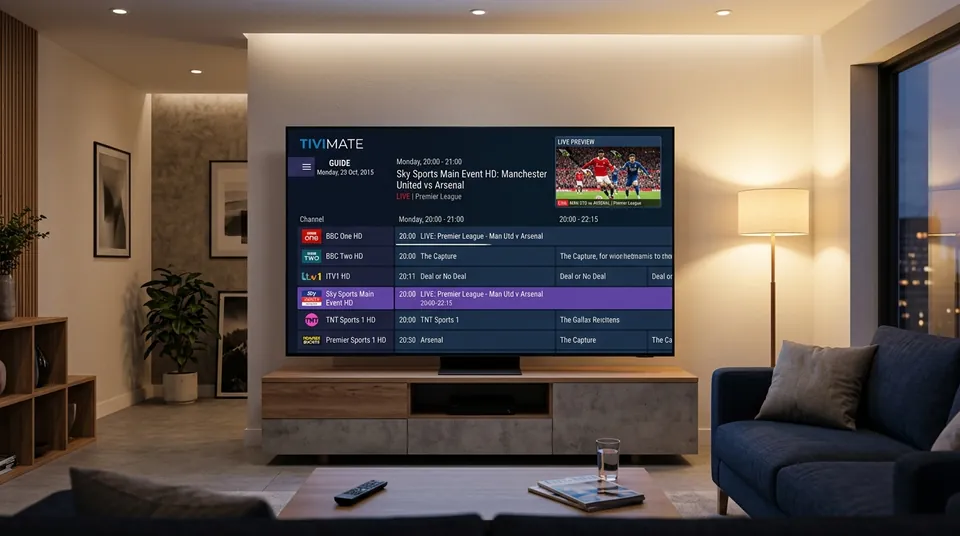 Native EPG Grid • Cable-Box Fluid Navigation
Does TiviMate include channels, or do I need an IPTV subscription?
One thing first, because it causes more confusion than anything else: TiviMate is a player, not a provider. It plays channels; it doesn’t supply them.
TiviMate comes with zero channels. Install it on a fresh Firestick and all you’ll see is an empty shell asking for a playlist — which is exactly where a huge share of beginner confusion starts.
You need a separate IPTV subscription from a provider, which gives you login credentials (usually an Xtream Codes API login: a server URL, username and password — or an M3U playlist URL). You type those into TiviMate, and the app becomes the window your channels play through. The subscription and the app are completely separate purchases from completely separate companies. So when someone says “my TiviMate subscription expired,” what actually expired is almost always their provider’s line — TiviMate the app was never a subscription to channels in the first place.
That’s the deal with our service: an IPTV UK subscription gives you the login details, and they work in TiviMate, IPTV Smarters Pro, XCIPTV and every other player on the IPTV player apps.
The Decoupled Architecture
🎮 TiviMate (The Player Shell)
- Application created by standalone developer Armobsoft FZE.
- Provides the TV guide grid, hardware decoder, zapping engine, and PVR recorder.
- Purchased via Google Play / TiviMate Companion app ($9.99/yr or $33.99 lifetime).
- Contains zero media, sports streams, or on-demand movies.
🛰️ IPTV UK Subscription (The Content Infrastructure)
- The high-performance streaming server broadcasting 45,000+ live television feeds.
- Delivers 50fps UK sports (Sky Sports, TNT Sports, 3pm Premier League kick-offs).
- Generates your active Xtream Codes login credentials and real-time EPG data.
- Supported by responsive UK WhatsApp customer care for active line troubleshooting.
Is TiviMate Premium worth it? (The question everyone asks)
This is the single most-asked TiviMate question in Facebook IPTV groups and forums, and the community verdict is remarkably consistent: yes — if you watch TV regularly, it’s the best few pounds you’ll spend on your setup. Users describe it as “the best money I spent on IPTV,” and the praise is organic and repeated across independent threads.
The free version is genuinely useful — people call it “fully functional for casual use.” But Premium is what turns TiviMate from a decent player into the one people won’t go back from. Here’s what the paid tier unlocks, and what it doesn’t.
What TiviMate Premium unlocks
- Multiple playlists. This is the number-one upgrade trigger. The free version handles one playlist; Premium lets you run several — say, your main subscription plus a backup line or a family member’s — and switch between them.
- Scheduled PVR recording. Set recordings from the TV guide, the way you’d use a Sky box. You’ll need somewhere to store them — a Firestick’s internal storage fills fast, so most users plug in USB storage.
- Multi-view. Watch several channels on screen at once — the football multitasker’s feature.
- No ads. The free version shows ads; Premium removes them.
- Settings backup and sync. Back up your full setup and restore it onto a second stick in minutes, or keep favourites and settings identical across the household’s devices.
What Premium won’t do (read this before you pay)
Premium is a feature unlock, not a performance upgrade. Users are explicit about this: it won’t make streams load faster and it won’t stop buffering. If your channels freeze, the cause is your provider’s servers, your ISP throttling, or your home network — never the app, and never something a paid app tier can fix. Community threads repeat this constantly because people keep hoping otherwise. If you’re seeing buffering, start with our buffering troubleshooter before spending anything.
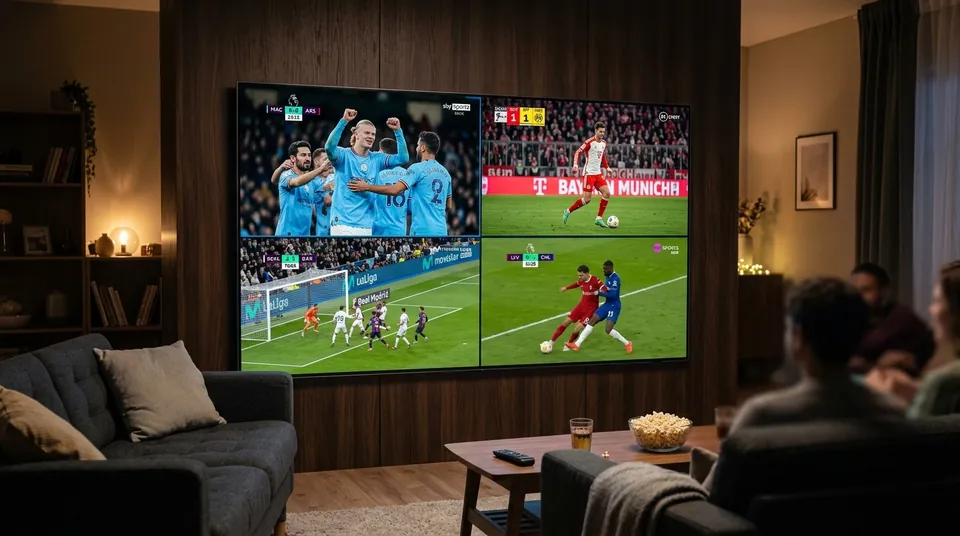 4-Way Simultaneous Matchday Split • Zero Lag
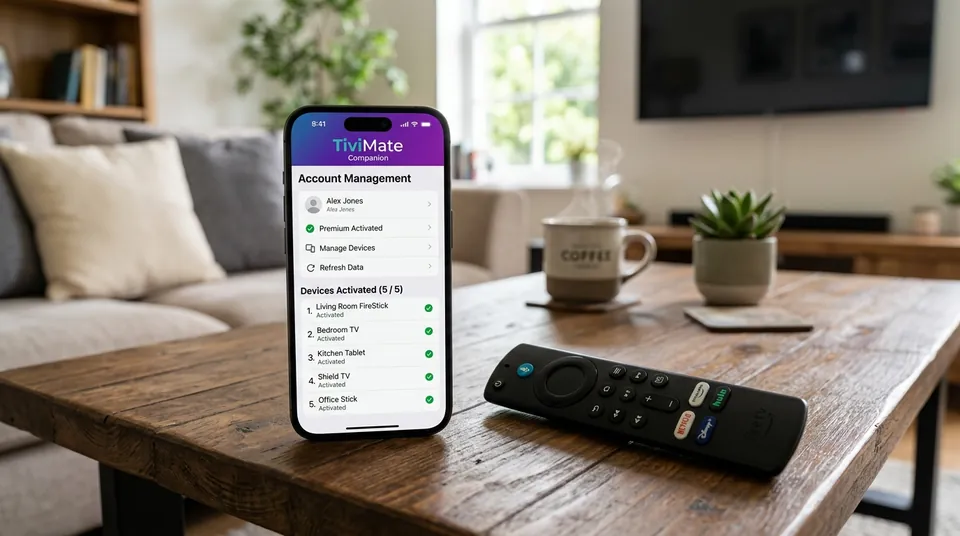 5 Device Activations per Single Licence
How much does TiviMate Premium cost?
Pricing reports vary because the price has changed over time — here’s the honest, user-reported picture:
- Around $9.99 per year, or around $33.99 for a lifetime licence — these are the figures current 2026 community reports converge on.
- Older reports cite $4.99/year. That figure is almost certainly outdated; expect it to have been replaced by the current pricing.
- The annual plan reportedly includes a 7-day free trial; the lifetime plan has no trial. If you’re unsure, start annual and upgrade later.
One licence covers up to 5 devices simultaneously — log in with the same TiviMate account on each device and they all share Premium. That’s the most misunderstood part of the pricing, so it gets its own section.
Does one TiviMate Premium licence work on multiple devices?
Yes. One Premium licence covers up to 5 devices at the same time. Buy it once, log into the same account under Settings → Account on each of your Firesticks or Android boxes, and they all get Premium features. You don’t register devices one by one and you don’t pay per device. The common misconception — that Premium is per device — comes from the fact that some other TV apps do charge per device (Smart IPTV’s activation is per TV, for example). TiviMate isn’t one of them.
How do I buy TiviMate Premium? (Why there’s no pay button in the app)
This trips up nearly everyone: you cannot buy Premium inside the TiviMate app itself. There is no pay button, no upgrade screen, no checkout anywhere on the TV version. That’s by design, not a bug.
The purchase happens through a separate app called the TiviMate Companion (on Google Play, installed on your phone):
- Install TiviMate Companion on your Android phone and create an account.
- Buy Premium there — choose annual or lifetime.
- On your Firestick/TV, open TiviMate → Settings → Account and log in with that same account.
- Premium activates across your devices.
Important Security Note: Keep the Companion app login details safe — it’s the only proof of purchase you have, and you’ll need it again if you ever reinstall or add a new device.
TiviMate Premium not showing up after I paid — fix
The second-most common Premium question. Work through this list in order:
If Premium “disappeared” after restarting your Firestick, it’s almost always the account login not persisting — logging back in under Settings → Account restores it. Your licence isn’t lost; the app just forgot who you are.
How do I add my playlist to TiviMate — Xtream Codes or M3U?
Both work, but the community recommendation is clear: use the Xtream Codes API login whenever your provider offers it. Here’s why — this applies across nearly every player app, not just TiviMate:
- Xtream Codes auto-sorts your channels into categories (Sports, Movies, UK, etc.) instead of dumping one giant list.
- It auto-populates the EPG (TV guide) — no separate guide URL to hunt down.
- It puts far less parsing work on your stick. An M3U playlist is a huge text file your device has to chew through, which is why big M3U lists can make cheap sticks sluggish.
The full comparison lives in our how Xtream Codes works and M3U playlist explained. The quick version for TiviMate:
- Open TiviMate → Add playlist → Xtream Codes login.
- Enter the server URL (starts with http:// and usually has a port number, like
:8080), your username and your password — exactly as your provider sent them. No trailing slash on the server URL. - Watch for auto-capitalisation and trailing spaces from the on-screen keyboard — “login failed” is almost always a typo, not a broken app.
- Wait for the playlist and EPG to load. First load on a big list takes a few minutes — that’s normal.
Our own logins work with both methods, and if you get stuck we’ll walk you through it on WhatsApp when you order.
My TiviMate EPG is empty or vanished — how do I fix it?
An empty TV guide is one of the most reported TiviMate issues, and it usually has a boring cause. Reload the EPG under Settings → EPG (if you used M3U, check the EPG URL is still valid — provider guide URLs change). Then check how many days you’re loading: reduce “Max EPG days” to 3–5, because a full 14-day load can make the guide appear empty on a Firestick simply from the parsing strain. If the guide loads but times are wrong, adjust the EPG time offset until programmes line up with your clock.
Free-version note: On the free tier, EPG refresh is manual — you trigger it yourself. Premium can update the guide automatically on a schedule every morning before you sit down to watch.
How do I record with TiviMate on a Firestick?
Recording is a Premium-only feature, and the Firestick’s small storage is the main thing to plan around. Go Premium first, then attach USB storage to your Firestick (with an OTG cable on most models) — internal storage fills after a couple of recordings. In TiviMate → Settings → PVR, point the recording folder at the USB drive, then pick programmes from the TV guide and choose Record (or set a scheduled/recurring recording).
Recordings store locally on your device — not on your provider’s servers, and your provider can’t recover them. If the stick runs out of space mid-recording, the recording just stops.
Does TiviMate work on iPhone, iPad or Apple TV?
iPhone and iPad: no. TiviMate is Android-only and there’s no iOS version. This is confirmed consistently across community threads — don’t trust sites offering “TiviMate for iPhone” downloads; they’re not the real app.
Apple TV: maybe. Some guides mention Apple TV support, but the community evidence is thin — it’s mentioned in passing rather than discussed by actual users. Treat it as unconfirmed rather than a promise. If you’re on Apple hardware, IPTV Smarters Pro has the stronger cross-platform story, and our Apple TV setup page walks through what actually works.
TiviMate vs IPTV Smarters Pro — which should I use?
The community hierarchy is consistent: TiviMate first for Firestick and Android TV power users; Smarters first for beginners and for phones. TiviMate wins on channel-zapping speed, guide layout and recording. Smarters wins on simplicity — the login screen is friendlier, it works on iPhone, and it holds your hand more. Both are free to try, both accept the same Xtream Codes login from your provider, and you can switch between them without changing anything on the subscription side. If you’re on a Firestick and you watch a lot of live TV, start with TiviMate. If you mostly watch on your phone or want the easiest possible first setup, start with Smarters.
| Feature Metric | TiviMate IPTV Player | IPTV Smarters Pro |
|---|---|---|
| Channel Zapping Speed | Instant (< 0.5s channel switch) | Fast (1.0s – 1.5s channel switch) |
| EPG Guide Interface | Cable/Satellite Grid with live preview | Simple list / tile category view |
| Multi-View Capabilities | Up to 9 screens simultaneously | Basic 4-screen split view |
| Local PVR Recording | Yes (scheduled & recurring) | Basic one-touch recording only |
| Mobile & iOS Support | No (Android TV / Firestick only) | Yes (Android, iPhone, iPad, PC) |
TiviMate setup tips from the community
Once it’s running: buffer size around 30 seconds, hardware decoding ON, animations off on Lite models, Max EPG days down to 3–5. Then use Settings → General → Backup Settings to clone the setup onto your other devices.
Get your login on WhatsApp — TiviMate ready in minutes
TiviMate is free to install, and your IPTV login is what brings it to life. Message us on WhatsApp and we’ll send your Xtream Codes details plus the exact settings for your device — Firestick, Android TV or Shield. Try the full thing free for 24 hours first: every channel, the full EPG, no card required. If you’re shopping around first, the IPTV subscription UK guide covers what to look for in any provider.